

What was deployed in 2015/2016
The study “Study and implementation of a Freeware Honeypot in a production environment” deployed Kippo on CentOS 6.5 inside a XenServer VM with a public IP address. The real environment had two dedicated Internet links (120 and 100 Mbit/s), servers, and network equipment with public addressing. The methodology was: research, honeypot selection, VM preparation, installation, observation, statistics generation, and analysis.
The figures below belong to the original experiment and are not current Internet statistics. They are preserved as evidence from a real 2015 environment.
Original architecture and methodology
The images below were extracted from the original 2016 study and are preserved as historical material.
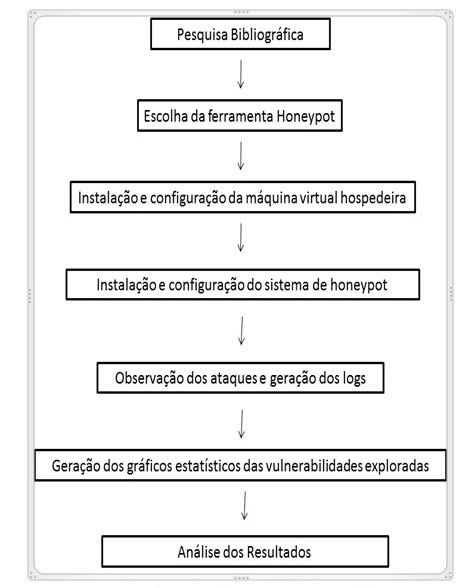 MethodologyResearch → deployment → observation → charts → analysis.
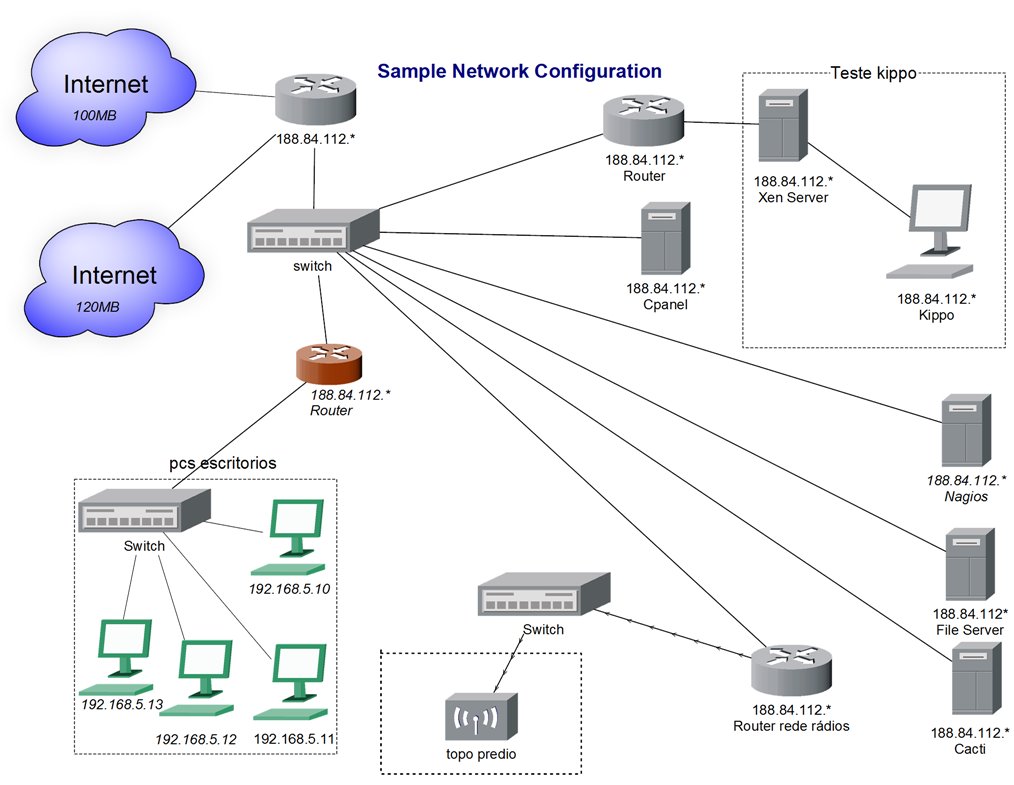 EnvironmentOriginal topology of the environment where the sensor was deployed.
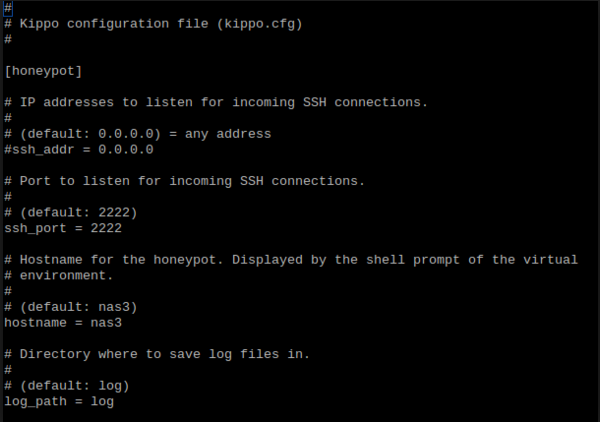 KippoHistorical SSH honeypot configuration.
What the attackers did
Kippo-Graph showed a predominance of the root username, trivial passwords, and predictable credential combinations. The study also recorded executed commands, file transfers/downloads, session replay, and approximate geolocation of source addresses. These results illustrate why Internet-facing SSH services are rapidly targeted by automated scanning and brute-force activity.
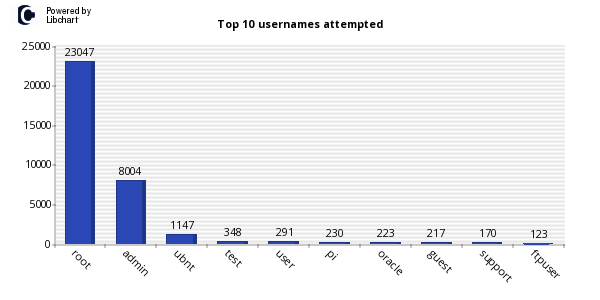 Usernamesroot was the most frequently attempted username.
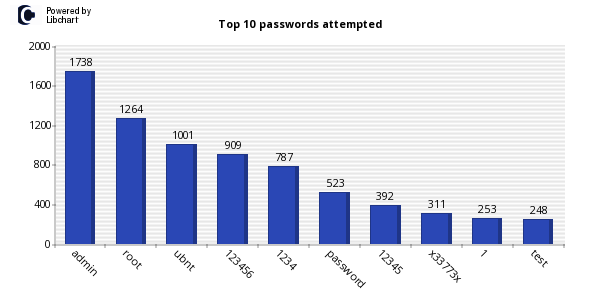 PasswordsSimple credentials appeared among the earliest attempts.
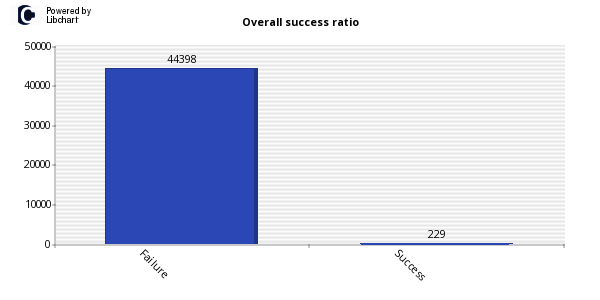 Controlled success229 authentications were accepted by the honeypot to allow observation.
Do not reproduce the 2016 installation literally
- CentOS 6.5, Python 2.5+, PyCrypto, and Kippo's old code.google.com address are legacy.
- Kippo should not be presented as the current implementation; use Cowrie.
- Kippo-Graph/LAMP/phpMyAdmin should not be publicly exposed as in the historical design.
- Weak credentials are deliberate only inside the isolated sensor; they are never a recommendation for a real server.
- IP geolocation does not identify an attacker and may reflect a VPN, proxy, botnet node, or compromised infrastructure.
How to deploy the equivalent in 2026
Internet
   │
[Firewall/NAT]
   │  external TCP/22 → sensor TCP/2222
   ▼
[Dedicated VM/Container: Cowrie]
   │  deny-by-default egress
   ├── cowrie.json / tty / downloads
   │
   └──► [remote log collector/SIEM on management network]

Real SSH administration ──► separate network/port ──► host- Create a dedicated VM/host and a dedicated network segment.
- Block egress by default; allow only destinations strictly required for operation.
- Install Cowrie under a non-root account using virtualenv/pip or the official container image.
- Keep the real administrative SSH service away from the honeypot's public-facing port.
- Redirect external TCP/22 to Cowrie only after validating an alternate administrative path.
- Forward logs to a remote collector and define retention.
- Treat downloads as potentially malicious; hash and store them in quarantine.
- Run a controlled test session and confirm connection, authentication, command, and session-close events.
Flow recommended by the maintainers
sudo adduser --disabled-password cowrie
sudo su - cowrie
mkdir ~/my-honeypot && cd ~/my-honeypot
python3 -m venv cowrie-env
source cowrie-env/bin/activate
pip install cowrie
cowrie init
$EDITOR etc/cowrie.cfg
cowrie start
The pip-based flow is recommended for operators in the current Cowrie 3.x documentation. Before exposing TCP/22, validate the sensor locally on its listening port and configure log collection.
Lab acceptance test
- Connect from a lab IP and confirm the honeypot banner/service.
- Perform a test authentication and verify the corresponding JSON event.
- Run harmless commands and verify session replay/session logs.
- Attempt a controlled file download and confirm quarantine/hash generation.
- Confirm the sensor cannot reach arbitrary external destinations.
- Confirm the real administrative service is not reachable through the same exposure.
- Restart/restore the sensor and verify persistence of the data that must survive.
Why this is still relevant
In 2026, CERT.br continues to operate the Distributed Honeypots Project for incident detection, event correlation, and analysis of attack trends in the Brazilian Internet space. The project uses distributed low-interaction sensors and publishes malicious-traffic statistics. This supports honeypots as a situational-awareness source when they are deployed with containment and a clearly defined purpose.
Sources
- Original 2016 study supplied to the portal: “Estudo e implementação de um Honeypot Freeware em um ambiente de produção”.
- Cowrie 3.x — stable documentation
- Cowrie — current installation guide
- CERT.br — Distributed Honeypots Project
- CERT.br — statistics and methodology